
Play PvPStrike on your graphics card
PvPStrike's 1v1 Duel, Defuse the Bomb and Battle Royale run in your browser on your computer's graphics. Laptops with two graphics chips give browsers the weaker, built-in one by default, and the game then lowers its quality to keep the frame rate. Switch your browser to the dedicated NVIDIA or AMD card once and every match looks sharper and runs smoother.
Checking your graphics…
- Windows: open Settings → System → Display → Graphics. Click Browse for an app and pick your browser, e.g.
C:\Program Files\Google\Chrome\Application\chrome.exe(Edge is usually listed already). Open it and set GPU preference to High performance, which names your NVIDIA or AMD card: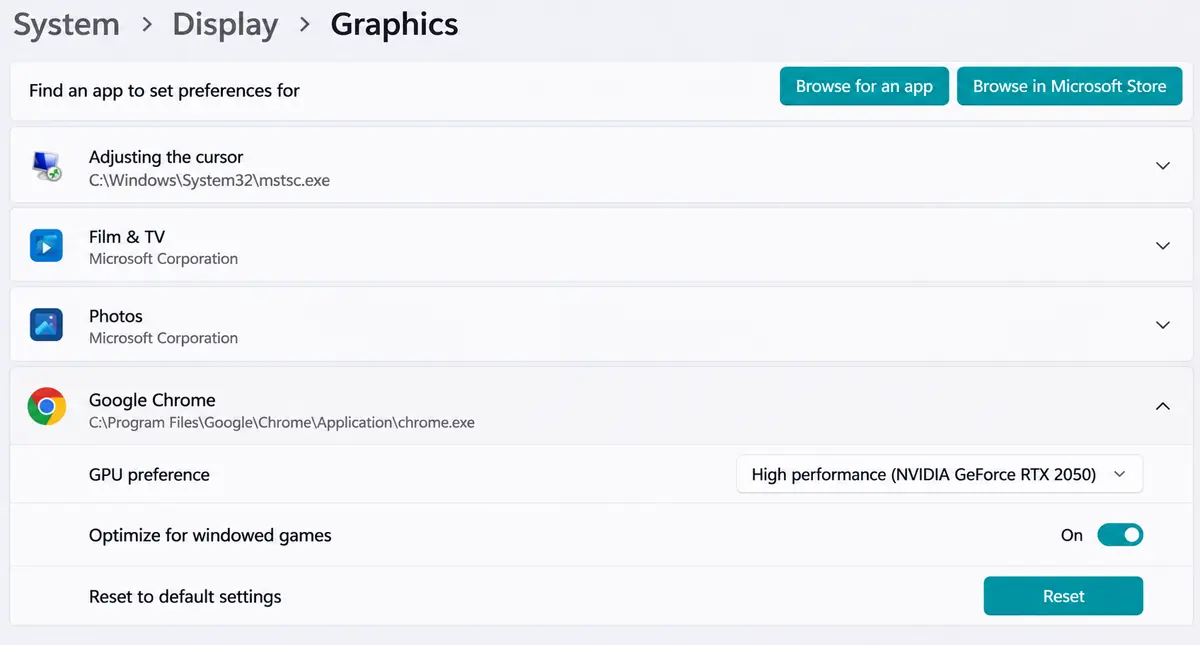
Google Chrome set to High performance in Windows' graphics settings. - Copy this address into a new tab's address bar (browsers do not open it from a link):
chrome://flags/#force-high-performance-gpuSet Force High Performance GPU to Enabled and press Relaunch. Edge, Brave and Opera: the same address withedge://,brave://oropera://instead ofchrome://.
Force High Performance GPU set to Enabled in Chrome. - In the browser's settings, under System, keep Use graphics acceleration when available on.
- Close every browser window, open it again and come back to this page: the line at the top should now name your NVIDIA or AMD card.
Still on the built-in chip? NVIDIA: NVIDIA Control Panel → Manage 3D settings → Program Settings → your browser → High-performance NVIDIA processor. AMD: AMD Software → Settings → Graphics → your browser → High performance.
In a match: press F3 to open the performance window. It shows your frame rate and the graphics card the game runs on.
Laptop tips: plug in the charger (on battery many laptops slow the card down), keep your graphics driver up to date, and close other heavy tabs.